Understanding Allma Studio
A comprehensive exploration of the architectural decisions, RAG implementation, and engineering challenges behind building a privacy-first local AI chat platform.
Contents
Problem Statement: The AI Privacy Paradox
The modern AI landscape presents users with a fundamental trade-off: access to powerful large language models in exchange for their data. Every prompt sent to cloud-based AI services like ChatGPT, Claude, or Gemini is processed on remote servers, creating privacy concerns for individuals and compliance nightmares for organizations.
Consider the implications: legal professionals cannot consult AI about sensitive cases, healthcare workers cannot analyze patient data, businesses cannot discuss proprietary strategies, and researchers cannot explore confidential findings. The most transformative technology of our time becomes off-limits for the most sensitive use cases.
Data Sovereignty
Your conversations processed on servers you don't control
Subscription Fatigue
Pay-per-token or monthly fees add up quickly
Internet Dependency
No connectivity means no AI assistance
Model Limitations
Locked into provider's model choices
The Core Problem
Allma Studio was conceived to solve this problem: a full-stack AI application that runs entirely locally, combining the conversational capabilities of modern LLMs with document-grounded RAG responses, all while maintaining complete user privacy and zero cloud dependency.
System Architecture: A Layered Approach
Allma Studio follows a microservices-inspired monolith architecture, where the application is structured as independent services but deployed as a single unit. This provides the benefits of clean separation while avoiding the complexity of distributed systems.
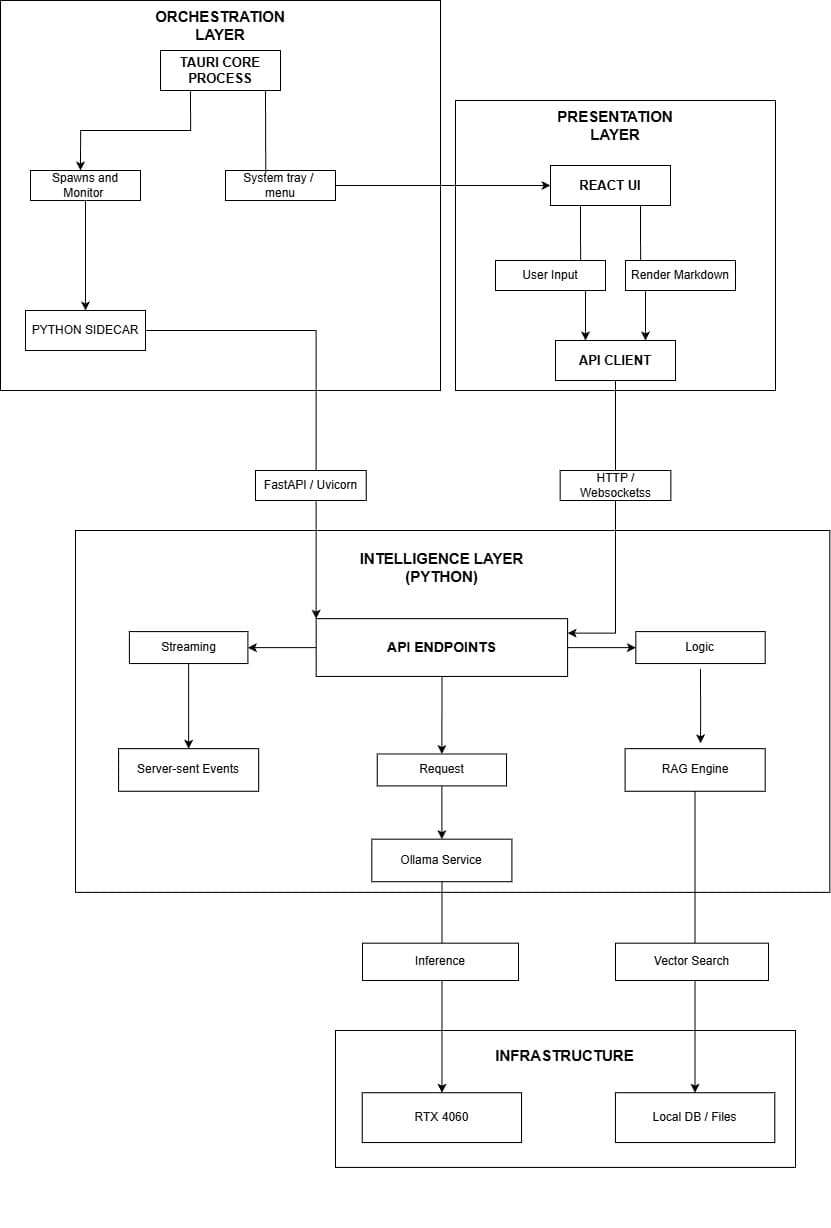
High-level system architecture showing the four-layer design: Orchestration, Presentation, Intelligence, and Infrastructure layers
Key Components
| Layer | Technology | Responsibility |
|---|---|---|
| Orchestration | Tauri Core Process | System tray, process spawning, Python sidecar management |
| Presentation | React + Vite | User interface, API communication, markdown rendering |
| Intelligence | FastAPI + Python | API endpoints, streaming, RAG engine, Ollama integration |
| Infrastructure | RTX GPU + LanceDB | GPU inference, local database, vector storage |
The Presentation Layer
Built with React and Vite, the frontend prioritizes developer experience and user responsiveness. Vite's instant Hot Module Replacement accelerates development cycles, while React's component model enables the rich, interactive chat interface users expect from modern AI applications.
TailwindCSS powers the styling system, providing utility-first classes that enable rapid UI iteration. The dark/light mode toggle uses CSS custom properties and local storage for persistence, respecting system preferences while allowing manual override.
The Intelligence Layer
FastAPI serves as the backend framework, chosen specifically for its async-first architecture and automatic OpenAPI documentation. The async support is critical: when users send messages, the backend must simultaneously query the vector store, construct prompts, and stream responses—all without blocking other requests.
Why SSE Over WebSockets?
RAG Implementation Architecture
Retrieval-Augmented Generation transforms Allma from a simple chat interface into a knowledge-aware assistant. Users upload their documents, and the system automatically extracts, chunks, embeds, and indexes the content—creating a searchable knowledge base that grounds every response in user-provided context.
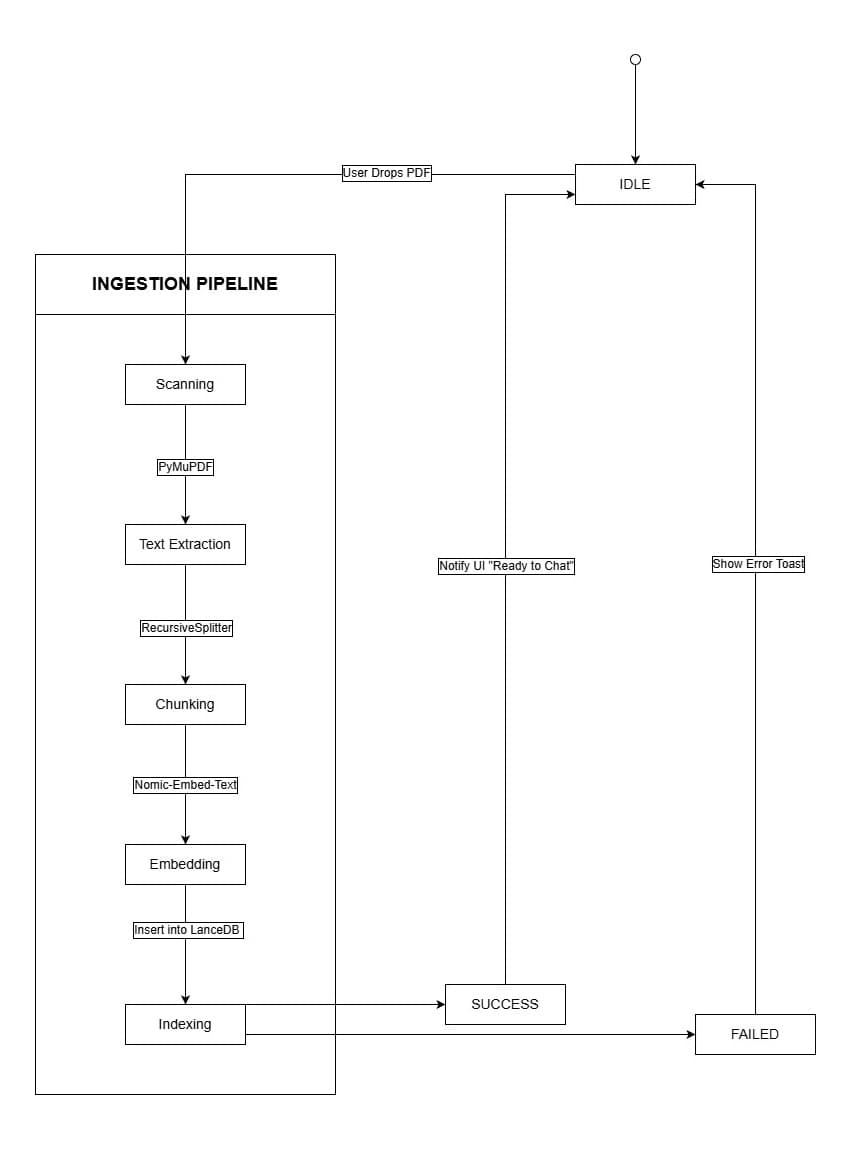
Complete RAG pipeline showing query processing through response generation with vector search and context assembly
Query-Time Retrieval Flow
When RAG is enabled, each user query triggers a sophisticated retrieval pipeline that enriches the LLM prompt with relevant context:
- Query Embedding — The user's question is embedded using the same model as document chunks (Nomic Embed Text)
- Similarity Search — LanceDB performs cosine similarity search to find the top-K most relevant chunks
- Context Assembly — Retrieved chunks are formatted with source attribution and prepended to the system prompt
- Prompt Construction — The orchestrator builds a complete prompt with context, instructions, and the user query
- Streaming Generation — Ollama generates the response token-by-token via Server-Sent Events
- Source Attribution — Chunk metadata is returned alongside the response for full transparency
Why Vector Search?
Document Ingestion Pipeline
The ingestion pipeline transforms raw documents into searchable vector embeddings. This state machine ensures robust handling of various file formats while maintaining UI responsiveness through clear state transitions.
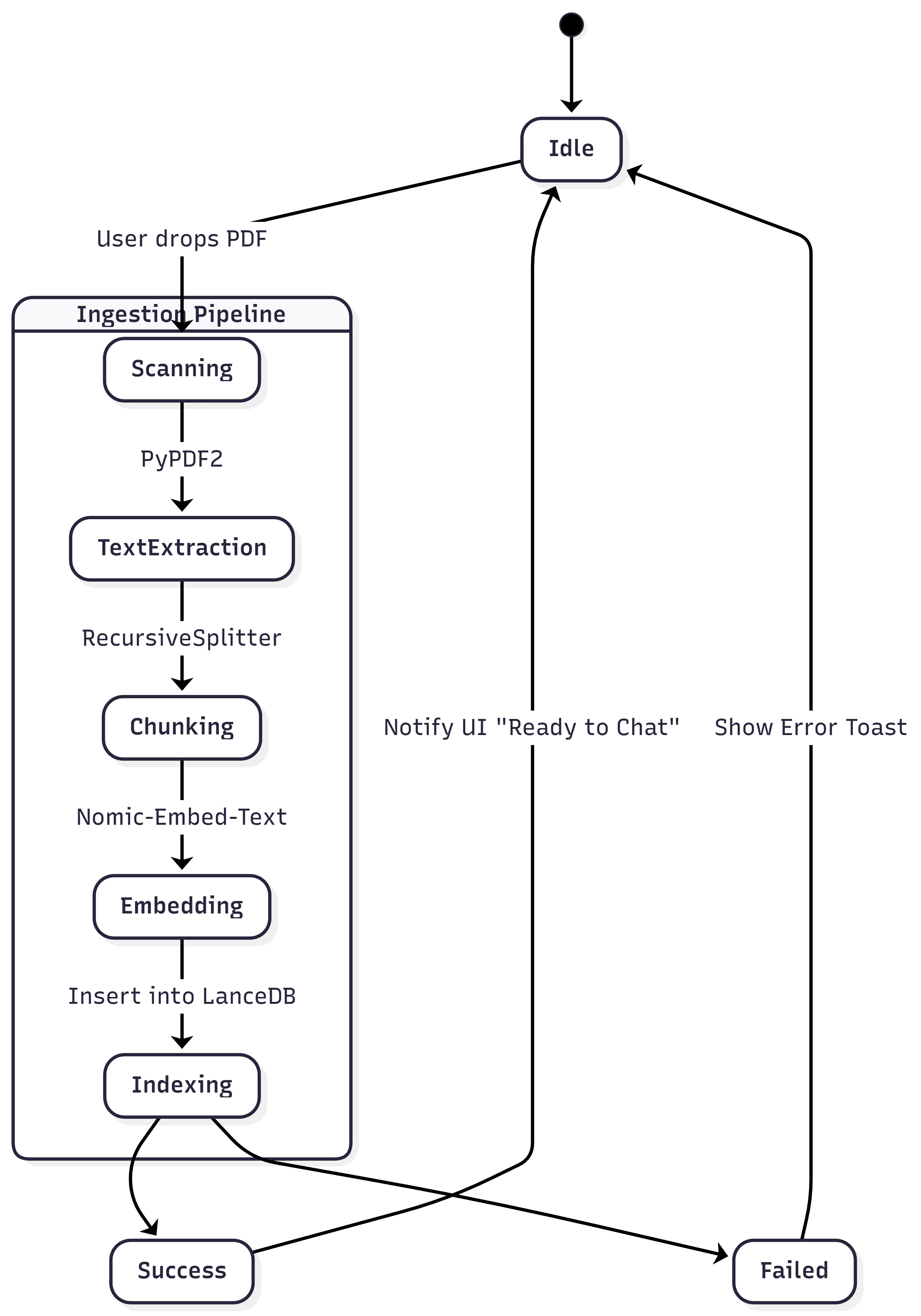
State machine showing the document ingestion flow from user upload through indexing with success/failure paths
Ingestion Stages
| Stage | Component | Description |
|---|---|---|
| Scanning | DocumentService | Detect file type, validate format (PDF, DOCX, MD, TXT, HTML) |
| Text Extraction | PyPDF2 / PyMuPDF | Parse documents with layout awareness, preserve structure |
| Chunking | RecursiveSplitter | Split into overlapping chunks (1000 chars, 200 overlap) |
| Embedding | Nomic-Embed-Text | Generate 768-dimensional vectors via Ollama |
| Indexing | LanceDB | Store embeddings with metadata for fast retrieval |
Why Overlapping Chunks?
Supported File Types
PDF Documents
Microsoft Word
Markdown
Plain Text
HTML Files
CSV Data
Orchestration Layer: The Central Brain
The orchestrator is the nervous system of Allma Studio—a central coordinator that manages the flow of data between services, maintains conversation state, and ensures each component receives the context it needs.
Backend Layer Overview
The backend follows a layered architecture with clear separation of concerns:
┌──────────────────────────────────────────────────┐
│              Presentation Layer                  │
│         (Routes / API Endpoints)                 │
├──────────────────────────────────────────────────┤
│              Orchestration Layer                 │
│         (Business Logic Coordinator)             │
├──────────────────────────────────────────────────┤
│               Service Layer                      │
│     (Domain-Specific Business Logic)             │
├──────────────────────────────────────────────────┤
│               Data Access Layer                  │
│    (Database, Vector Store, External APIs)       │
└──────────────────────────────────────────────────┘
Service Coordination
The orchestrator coordinates four primary services:
RAGService
Embedding generation, vector search, context assembly
DocumentService
File parsing, text chunking, metadata extraction
VectorStoreService
LanceDB operations, similarity search
ConversationService
Chat history, memory management
Route Handlers
| File | Responsibility |
|---|---|
| chat.py | Chat message handling, streaming responses |
| rag.py | Document ingestion, RAG queries, search |
| models.py | Ollama model management, switching |
| health.py | System health checks, component status |
Why Centralized Orchestration?
Vector Store: LanceDB for Semantic Search
LanceDB serves as the persistent vector database, storing document embeddings and enabling fast similarity search. Unlike cloud-based alternatives like Pinecone or Weaviate, LanceDB runs entirely locally with no external dependencies.
Why LanceDB?
- Zero Configuration — Works out of the box with sensible defaults
- Python Native — First-class Python integration with type hints
- Persistent Storage — Survives restarts with configurable data directory
- Metadata Support — Store and filter by arbitrary metadata alongside vectors
- Local-First — No cloud account, API key, or network required
- Fast SIMD — Optimized vector operations using CPU SIMD instructions
Embedding Model Selection
Nomic Embed Text was selected as the embedding model for several reasons:
Fully open source with commercial use
Competitive with proprietary models
274MB runs efficiently on consumer hardware
768-dimensional embeddings
Collection Strategy
Database Design: Entity Relationships
Allma Studio uses a combination of SQLite for conversation storage and LanceDB for vector embeddings. This hybrid approach optimizes each storage system for its specific use case.

Data model showing relationships between Session, Message, Document, and Chunk entities
Key Entities
SESSION
- idUUID (PK)
- namestring
- created_atdatetime
- model_usedstring
MESSAGE
- idint (PK)
- roleuser/assistant
- contenttext
- tokensint
- is_rag_searchboolean
DOCUMENT
- pathstring
- checksumstring (hash)
CHUNK
- idstring (PK)
- embeddingVector[768]
- raw_texttext
Key Relationships
- Session → Messages — One session contains many messages (1:N)
- Document → Chunks — One document splits into many chunks (1:N)
- Chunk → Embedding — Each chunk has exactly one vector (1:1)
- Message → Sources — RAG messages reference multiple source chunks (N:N)
Real-Time Streaming: Token by Token
AI responses can take several seconds to complete. Without streaming, users would stare at a blank screen—an eternity in modern UX terms. Allma implements true token streaming, displaying each token as it's generated.
Server-Sent Events Implementation
The streaming pipeline uses Server-Sent Events (SSE) to push tokens to the frontend:
# Backend (FastAPI)
async def stream_response():
    async for token in ollama.chat_stream(prompt):
        yield f"data: {json.dumps({'content': token})}\n\n"
    yield f"data: {json.dumps({'done': True, 'sources': sources})}\n\n"

# Frontend (React)
const eventSource = new EventSource('/api/chat');
eventSource.onmessage = (event) => {
    const data = JSON.parse(event.data);
    if (data.done) {
        setSources(data.sources);
    } else {
        appendMessage(data.content);
    }
};
Message Types
| Type | Direction | Description |
|---|---|---|
| message | Client → Server | Send user message |
| token | Server → Client | Streaming token chunk |
| done | Server → Client | Response complete with sources |
| error | Server → Client | Error occurred |
Why Token Streaming?
Privacy & Security: Zero Data Transmission
Privacy isn't a feature of Allma Studio—it's the foundation. Every architectural decision was made to ensure that sensitive data never leaves the user's machine.
Security Layers
CORS Policy
Configurable allowed origins, preflight request handling
Rate Limiting
Per-IP request limits with configurable thresholds
Input Validation
Pydantic model validation, file type restrictions, size limits
Error Handling
Sanitized error messages, no stack traces in production
Data Privacy Guarantees
Zero Telemetry
No data collection or phone-home
Local Processing
All LLM inference happens locally
User Control
Data stored locally, easily deletable
No Dependencies
Works fully offline
True Local-First
Challenges & Solutions
Building a production-quality local AI application surfaced several engineering challenges. Here's how we solved them:
Memory Management with Large Documents
Processing 100+ page PDFs could exhaust system memory
Solution: Implemented streaming document processing with chunk-level commits. Documents are processed in batches, with embeddings committed to LanceDB after each chunk group, preventing memory accumulation.
Model Loading Latency
First response after model switch took 10+ seconds
Solution: Pre-warm the default model on application startup. Added model switching UI feedback with loading states. Ollama's keep-alive maintains the model in GPU memory between requests.
Demo Mode Without Backend
Users needed to experience the UI without installing Ollama
Solution: Built a demo API layer that simulates streaming responses with realistic typing delays. The frontend automatically falls back to demo mode when the backend is unavailable.
Cross-Platform Compatibility
Supporting Windows, macOS, and Linux with GPU acceleration
Solution: Leveraged Ollama's cross-platform support for GPU inference. Provided Docker Compose configurations for containerized deployment. Tauri enables native desktop apps across all platforms.